This checklist is for reporters who need to record interviews, capture video, and keep working in changing field conditions. It brings together audio, camera, lighting, storage, and weather protection picks for a reporting kit.

Get everyday essentials delivered free with Prime
- Fast, free delivery on millions of items
- Prime Video, Amazon Music and more included
- Member-only deals all year
The sections follow the equipment categories, with one named pick in each. Use the notes to think through your reporting format and what needs to work together before choosing what to carry.
Check the product’s current specifications and your existing gear before buying. Confirm compatibility, fit, and included accessories for your exact camera, phone, computer, and workflow.
Portable Audio Recorder
A portable recorder can serve as a dedicated part of an interview or field audio setup. The Zoom F3 Professional Field Recorder is the pick in this slot; consider how it fits alongside your microphones, headphones, and the way you transfer recordings after a reporting day.
A common buying mistake is treating the recorder as a complete audio kit. Confirm which microphones and cables you will use, how the recorder connects to them, and whether you need to monitor audio while recording. Check the device’s current specifications for supported connections, recording formats, power, and storage media rather than assuming they suit your workflow.
Think about where the recorder will sit during an interview and how you will protect it while moving between locations. Make sure the connectors and cable lengths fit your setup, and allow room in your bag for the recorder and any required accessories. Before relying on it for an assignment, confirm that your computer can open the files and that your backup process preserves them.
What to look for:
- Confirm microphone and headphone connections match your setup.
- Check supported recording formats and your editing workflow.
- Verify storage media and power requirements.
- Plan how the recorder and cables will be carried and protected.
Zoom F3 Professional Field Recorder
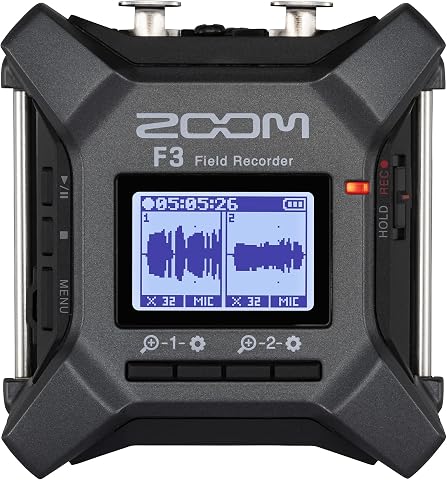
The Zoom F3 is a two-channel field recorder with 32-bit float recording and dual A/D converters, designed to capture audio from quiet dialogue to sudden peaks without manual level adjustments. It has two locking XLR inputs, low-noise preamps, flexible power options, and supports standalone or USB workflows.
Pros:
- 32-bit float recording handles a wide range of sound levels without adjusting levels
- Locking inputs help keep connections secure
- Low-noise preamps support clean recordings
- Flexible power and USB workflows
Cons:
- Requires two AA batteries
- MicroSD card is needed for recording
Best for: Reporters building a separate recorder-based audio setup.
Not ideal for: Those who need a recorder that works with their existing gear without checking connections.
Bottom line: Confirm microphone, storage, and computer compatibility before making the Zoom F3 the center of your field audio kit.
Wireless Lavalier Microphone
A wireless lavalier kit can help reporters capture speech when a microphone needs to be worn rather than held. The listed pick is the DJI Mic 3 Wireless Microphone Kit, described as having two transmitters and one receiver. Consider whether that configuration matches the number of people you expect to record and the device receiving the audio.
Do not assume that a kit connects directly to every camera, phone, or recorder. Check the current package contents, connector types, and compatibility guidance for your exact recording device. Also confirm whether you need adapters, a particular phone connection, or a separate way to monitor sound. For interviews, plan how each transmitter will be assigned and how you will keep the subjects’ audio identifiable during editing.
Think about placement and movement as well as wireless operation. Clothing, microphone position, and cable routing can affect how practical a setup is in the field. Check what carrying, attachment, and charging accessories are included, then decide what extras you need. Before an assignment, test the complete kit with the intended camera or phone, including the recording and playback steps you will use on location.
What to look for:
- Verify receiver compatibility with your camera, phone, or recorder.
- Check whether the listed two-transmitter setup suits your interview format.
- Confirm included adapters, attachment accessories, and charging components.
- Test microphone placement and playback with your actual recording device.
DJI Mic 3 Wireless Microphone Kit (2 Transmitters, 1 Receiver, Charging Case)
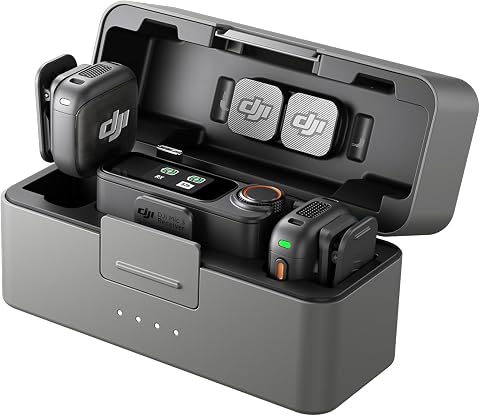
A compact wireless lavalier microphone kit for vlogs, interviews, podcasts, and other recordings. It offers four-channel support, adaptive gain control, two noise-cancellation levels, dual-band anti-interference, 32-bit float internal recording, and up to 28 hours of use.
Pros:
- Compact and lightweight for travel and mobile recording
- Supports up to four transmitters and four-channel output
- 32-bit float internal recording helps preserve audio detail
- Up to 28 hours of use
Cons:
- Some listed features, including direct connection, are limited to compatible DJI devices
- Requires four included C batteries, according to the product specifications
Best for: Reporters recording interviews with compatible devices.
Not ideal for: Those who need a direct connection to a device without verifying compatibility.
Bottom line: Match the receiver and required adapters to your recording device before taking the DJI Mic 3 into the field.
Camera Tripod
A tripod can support stable framing when a report calls for a fixed camera position. The pick here is the HEIPI W28S Carbon Fiber Travel Tripod with Arca-Swiss Ball Head. Check that its mounting system matches your camera plate or that you have a compatible plate for the setup you plan to carry.
A frequent mistake is focusing on the tripod name without checking the complete camera load and working position. Consult the current product specifications for capacity, folded dimensions, height, and included components, then compare them with your camera and lens. Consider how the tripod will fit in your bag and whether its setup suits the kinds of locations you cover. Make sure the ball head and quick-release arrangement work with your camera plate.
Fit also involves the ground and the shot: a tripod that works on one surface or in one framing position may not suit another. Check the leg and head adjustments against your typical camera angles, and make sure you can operate the locks confidently. If you already use Arca-Swiss-compatible plates, verify that the specific plate fits; if not, account for the plate needed to connect your camera.
What to look for:
- Compare listed load capacity with your camera and lens combination.
- Check folded size and working height against your carry needs.
- Confirm the camera plate fits the Arca-Swiss ball head.
- Review included components and verify adjustments suit your framing.
HEIPI W28S Carbon Fiber Travel Tripod with Arca-Swiss Ball Head

This versatile travel tripod converts into a full-size tripod, a standalone sub-tripod, or a removable ball head for low-angle and desktop shots. It weighs 3 lbs, folds to 17.7 inches, and includes a quick-release ball head with panoramic panning modes and a hidden phone clamp.
Pros:
- Configures as a full-size tripod, sub-tripod, or removable ball head
- Lightweight and compact for travel
- Quick-release design supports one-handed camera attachment
- Ball head includes panoramic panning modes and a hidden phone clamp
Cons:
- No minimum height is provided
- Phone clamp is integrated into the ball head
Best for: Reporters who need a camera support that fits their field setup.
Not ideal for: Those who have not checked camera load and plate compatibility.
Bottom line: Verify camera load, plate fit, and packed dimensions before choosing the HEIPI W28S for reporting.
LED Video Light
Lighting can be a useful part of a video reporting setup when the available light does not suit an interview or shot. This checklist names the Godox LP600Bi 60W Bi-Color LED Light Panel 2-Light Kit, with battery/DC in its listed name. Consider whether a two-light kit fits your shooting style, crew, and the space you have available.
Check the current specifications and included accessories before planning around the kit. Verify the power options, battery requirements, charging approach, and any stands or mounting parts you will need. A common mistake is assuming that a light kit includes every support or power component required for a location. Confirm the color and brightness controls described by the manufacturer and whether they suit your camera workflow.
Think through transport and setup as carefully as illumination. Two lights may require more bag space and setup time than a single light, so check the packed dimensions and how you will carry stands, cables, and batteries. Confirm that mounts fit your supports and that the planned power source is practical for the location. Test both lights with your camera before an assignment so you know how the setup looks in recorded footage.
What to look for:
- Confirm the kit’s included lights, power components, and mounts.
- Check battery and DC power requirements for your locations.
- Verify stands and mounting hardware fit the panels and your supports.
- Consider packed size and setup time for a two-light arrangement.
Godox LP600Bi 60W Bi-Color LED Light Panel 2-Light Kit with Battery/DC Power

The Godox LP600Bi 2-light kit provides a portable, all‑in‑one lighting solution featuring two 60W bi‑color LED panels with a wide 2800K‑6500K temperature range and 11 built‑in FX effects. Each panel delivers up to 9020 lux at 0.5 m with CRI/TLCI ratings of 96+, ensuring accurate color reproduction, while dual power options let you work from AC adapters or NP‑F batteries.
Pros:
- High output (60W) delivering bright illumination up to 9020 lux
- Accurate color rendering with CRI/TLCI 96+ for professional results
- Wide bi‑color range and 11 built‑in FX effects for creative lighting
- Dual power options (AC adapter or NP‑F batteries) for flexible use
Cons:
- Requires two NP‑F batteries per panel, so extra batteries are needed for long shoots
- Light stands are lightweight and best suited for indoor studio setups
Best for: Video reporters planning a portable two-light setup.
Not ideal for: Those who need a compact single-light kit or have not planned power and support.
Bottom line: Check what the Godox kit includes and plan compatible power and mounting before packing it.
Portable SSD
A portable SSD can be part of a field workflow for moving or keeping copies of reporting files. The named pick is the Samsung T9 Portable SSD 4TB. Consider where it fits in your process: as working storage, a transfer drive, or one part of a broader backup plan.
Capacity alone does not establish compatibility. Check the drive’s current connection type and requirements against the ports on your camera, card reader, phone, and computer. Confirm whether your workflow needs a cable or adapter not included with the drive. Also check supported file systems and operating system compatibility before you depend on the drive to exchange footage between devices.
One common mistake is treating a single portable drive as the only copy of important material. Decide how files will be copied, labeled, and backed up, and confirm that the drive works with your software and devices. Consider how you will carry and protect it while reporting, and whether the available connection and transfer process suit your volume of footage. Test a full transfer and open representative files before traveling with the drive as part of your workflow.
What to look for:
- Verify the drive connection matches your computer and transfer devices.
- Check operating system and file system compatibility.
- Confirm whether required cables or adapters are included.
- Plan a backup and file verification process for field recordings.
Samsung T9 Portable SSD 4TB

The Samsung T9 Portable SSD offers up to 4TB of storage with sustained read and write speeds of up to 2,000 MB/s via USB 3.2 Gen 2×2. It features Dynamic Thermal Guard to manage heat during heavy use and includes AES 256-bit hardware encryption for security.
Pros:
- Extremely fast transfer speeds up to 2,000 MB/s
- High capacity of 4TB suitable for large media projects
- Advanced thermal management keeps the drive cool during heavy use
- Broad compatibility with modern devices including iPhone and gaming consoles
Cons:
- Maximum speeds require specific USB 3.2 Gen 2×2 host support
- Enclosure material details are not specified
Best for: Reporters moving substantial media files between compatible devices.
Not ideal for: Those relying on one drive as their only copy of important reporting files.
Bottom line: Confirm connection and system compatibility, then plan a separate backup for files stored on the Samsung T9.
Camera Rain Cover
A rain cover helps address the practical need to protect camera equipment when reporting in wet conditions. The listed pick is the Think Tank Photo Emergency Rain Cover for DSLR and mirrorless cameras. Before choosing it, check the manufacturer’s fit guidance for your exact camera and lens combination.
A common mistake is assuming that a cover described for DSLR and mirrorless cameras will fit every body, lens, or accessory arrangement. Compare the listed compatibility and dimensions with your camera, lens, hood, and any attached microphone or cables. Check how the cover is accessed and secured, and whether it allows the controls you need to reach while shooting. Confirm what is included and how the cover is stored when not in use.
Think about the conditions and camera position you expect to encounter. The cover needs to fit the assembled setup you plan to use, so check it with the actual camera and lens rather than only the camera body. Try fitting and removing it before an assignment, including while wearing the clothing or gloves you typically use outdoors. Keep the cover accessible in your bag so it is ready when the weather changes.
What to look for:
- Check fit guidance for your exact camera and lens combination.
- Account for lens hood, microphone, and attached cables.
- Verify access to controls and viewfinder while covered.
- Practice fitting and storing the cover with your field setup.
Think Tank Photo Emergency Rain Cover for DSLR and Mirrorless Cameras, Medium (R

This rain cover provides extreme protection for DSLR and mirrorless cameras with 70-200mm lenses in heavy rain or dusty conditions. It features a seam-sealed design, a large viewing window, and compresses into a compact pouch for easy transport.
Pros:
- Provides excellent protection in harsh weather conditions
- Compact and portable design
- Large window for easy LCD viewing and controls
Cons:
- May be bulky for small cameras
- Limited to medium-sized lenses
- Requires careful fitting to ensure waterproof seal
Best for: Reporters seeking a cover sized for a compatible camera setup.
Not ideal for: Those who have not checked fit with their lens and attached accessories.
Bottom line: Confirm the Think Tank cover fits your complete camera setup and practice using it before fieldwork.
Build the kit in the order your reporting depends on: start with the gear needed to capture clear audio and video, then address storage, camera support, lighting, and weather protection according to your assignments. Before buying, verify compatibility and included accessories so you know what else your setup requires.
Use this checklist as a starting point, then test the complete kit with your own camera, recording devices, and workflow. A little preparation helps you arrive ready to capture and protect your reporting in the field.
Halloween Picks

12-Foot Inflatable Pumpkin Halloween Archway with LED Lights

15-Foot Halloween Pumpkin Inflatable with LED Lights and Air Blower

MGparty 14.5 ft Halloween Inflatable Walk-In Pumpkin House with LED Lights
As an affiliate, we earn on qualifying purchases.