Use this guide to choose smart home devices during Cyber Monday sales without buying products that do not fit your home, phone, or existing setup. It is for first-time buyers and people expanding a smart home who want to compare deals before ordering. Plan for 30-60 minutes to review what you need, check compatibility and sale terms, and confirm your selections.

Get everyday essentials delivered free with Prime
- Fast, free delivery on millions of items
- Prime Video, Amazon Music and more included
- Member-only deals all year
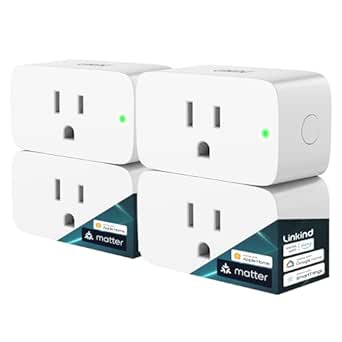
Linkind Matter Smart Plug, 4-Pack
- ✔ Pack size: 4 plugs
- ✔ Plug type: Type A
- ✔ Power capacity: 1800 W

Echo Show 5 (Newest Model) – Smart Display with Enhanced Bass, Charcoal
- ✔ Display: 5.5-inch touchscreen
- ✔ Camera: 2 MP with built-in shutter
- ✔ Speaker: 1.75-inch full-range
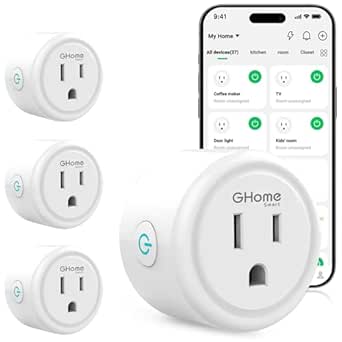
GHome Smart Wi-Fi Plug with Alexa and Google Home Compatibility, 4-Pack
- ✔ Quantity: 4 plugs
- ✔ Connectivity: Wi-Fi with Bluetooth setup
- ✔ Wi-Fi requirement: 2.4 GHz
Difficulty: Beginner | Time: 30-60 minutes
What You’ll Need
Tools & Materials:
- A phone or computer with internet access
- Your current smart home app and device model names, if you already own devices
- A note or spreadsheet for comparing prices, features, and return terms
Knowledge:
- Basic familiarity with your home Wi-Fi and smartphone
- The rooms or tasks you want to automate, such as lighting, security, or temperature
Decide whether you are shopping for a specific need or browsing deals. Set a spending limit before opening sale pages. If you already use a smart home platform, identify it and check the model names of your hub, router, and devices.
Linkind Matter Smart Plug, 4-Pack
For a household that mixes smart home platforms, the Linkind Matter Smart Plug 4-Pack is the most versatile plug choice here. It is listed for Apple Home, Alexa, Google Home, and SmartThings, giving it a wider stated ecosystem reach than the GHome pack, which supports Alexa and Google Assistant. Matter devices can communicate locally during an internet outage, a useful distinction when we want local control to remain available. The four Type A plugs also support scheduling, timers, voice commands, and remote access, making them suited to lamps and other compatible devices around the home.That flexibility comes with setup conditions. To use Linkind with the major platforms, we need a compatible Matter hub; it is not the hub-free shortcut that GHome offers. Linkind also specifies 2.4 GHz Wi-Fi and IPv6, so buyers should check their network before choosing it. Its listed 1800 W capacity exceeds GHome’s 1200 W maximum, but we still need to confirm the rating suits the appliance we plan to connect. For Cyber Monday shoppers planning a connected-home expansion, this is the strongest plug pack when platform choice and local Matter communication matter more than the simplest onboarding.
Pros:
- Works with Apple Home, Alexa, Google Home, and SmartThings
- Matter devices can communicate locally during internet outages
- Four plugs with remote control, voice commands, schedules, and timers
- 1800 W listed power capacity with short-circuit and overload protection
Cons:
- A compatible Matter hub is required for major platform use
- Requires 2.4 GHz Wi-Fi and IPv6
Best for: Households with a compatible Matter hub that want smart plugs across Apple Home, Alexa, Google Home, or SmartThings.
Not ideal for: Buyers without a Matter hub, or anyone whose network does not support the listed 2.4 GHz and IPv6 requirements.
Bottom line: Choose Linkind when we want the broadest platform reach in this comparison and already have the Matter hub and network support it needs.
“Choose Linkind when we want the broadest platform reach in this comparison and already have the Matter hub and network support it needs.”
Echo Show 5 (Newest Model) – Smart Display with Enhanced Bass, Charcoal
The Echo Show 5 is the only product here that makes smart home control visible. Its 5.5-inch touchscreen can put information and Alexa controls at a glance, while the 2 MP camera supports video calls and includes a physical shutter. That makes it a different kind of Cyber Monday pick from either four-pack: we choose it to add a compact Alexa display to a bedside table or kitchen counter, not to automate several lamps in one purchase. Compared with the Linkind and GHome plugs, it asks us to trade outlet-level automation for an interactive hub-like screen and speaker.The upgraded speaker is described as offering deeper bass and clearer vocals, but the 1.75-inch full-range speaker still has limits in a larger room or for loud music. Buyers who mainly want plug control should get more direct utility from either plug pack. The Echo Show’s camera shutter and mic-off button offer tangible privacy controls, and its recycled fabric and aluminum give it a materials distinction absent from the plug listings. We should still choose it with Alexa at the center: it is the best fit for visual smart home access in this group, but it does not replace a broad ecosystem-neutral plug setup.
Pros:
- 5.5-inch touchscreen shows controls and information at a glance
- 2 MP camera has a physical privacy shutter and mic-off control
- Alexa smart home integration in a compact display
- Uses recycled polyester fabric and recycled aluminum
Cons:
- Small speaker may not suit large rooms or loud music
- Bluetooth support has limitations, including no hands-free support for Mac devices
- Does not support ad-hoc Wi-Fi networks
Best for: Alexa users who want a compact touchscreen for smart home controls, glanceable information, photos, and video calls.
Not ideal for: Shoppers whose priority is automating multiple appliances, or those seeking a speaker for a larger room.
Bottom line: Pick the Echo Show 5 when a visual Alexa control point and video calls matter more than adding several smart outlets.
“Pick the Echo Show 5 when a visual Alexa control point and video calls matter more than adding several smart outlets.”
GHome Smart Wi-Fi Plug with Alexa and Google Home Compatibility, 4-Pack
When we want several outlets controlled by Alexa or Google Assistant and prefer to skip a separate hub, the GHome Smart Wi-Fi Plug 4-Pack is the most direct fit. It supports schedules, timers, group control, and family sharing through the GHome, Smart Life, or Tuya apps. That makes it more approachable for a straightforward plug setup than Linkind, whose wider platform reach depends on a compatible Matter hub. Both packs offer four plugs and 2.4 GHz Wi-Fi, but GHome lists a 1200 W maximum, below Linkind’s 1800 W capacity, so appliance compatibility deserves attention.GHome’s convenience is tied to its app workflow: we must connect the plugs to the network and GHome app before using Alexa or Google Home. It therefore suits buyers comfortable with app-based setup and the two named voice assistants, but it is not the cross-platform choice for Apple Home or SmartThings users. The listing includes Bluetooth setup, yet Wi-Fi remains required for operation. Against the Echo Show 5, this pack is the more practical choice when the goal is controlling multiple appliances; it lacks a screen and camera, but it gives us four points of outlet control rather than one display.
Pros:
- Four plugs support app control and Alexa or Google Assistant voice commands
- Scheduling, timers, group control, and family sharing
- Works with GHome, Smart Life, and Tuya apps
- No separate hub is required
Cons:
- Requires a 2.4 GHz Wi-Fi network
- Must be set up in the GHome app before voice assistant use
- 1200 W maximum is lower than Linkind’s listed capacity
Best for: Alexa or Google Assistant households that want four app-controlled plugs without buying a separate hub.
Not ideal for: Apple Home or SmartThings users, buyers who need Matter’s stated local communication, or anyone whose appliance exceeds the 1200 W limit.
Bottom line: Choose GHome for a hub-free, app-led way to automate several compatible appliances through Alexa or Google Assistant.
“Choose GHome for a hub-free, app-led way to automate several compatible appliances through Alexa or Google Assistant.”
As an Amazon Associate we earn from qualifying purchases.
Before You Start
Cyber Monday prices, stock, and shipping dates can change quickly. Check the product’s final price in the retailer’s cart and read the return policy before paying. For cameras, locks, and other security devices, review required subscriptions, data storage, and privacy settings as part of the total cost.
Do not assume two devices work together because they use Wi-Fi or carry the same broad smart home label. Check the exact product model, supported platform, connection requirements, and any required hub.
Step-by-Step Instructions
Step 1: List the tasks you want to automate
Write down up to three concrete goals, such as turning lamps on at sunset, seeing who is at the front door, or adjusting the thermostat when you are away. Note the room, who will use the device, and any existing equipment it must work with. Rank the goals so you can focus on products that solve a real need.
Tip: If you are new to smart home devices, start with one room or one task. A small setup is easier to configure and troubleshoot.
Check: You have a short ranked list of tasks and know which purchase would help most.
Step 2: Set a total budget
Choose a maximum amount for the purchase, including accessories, a hub, installation, and recurring fees. For products such as cameras or doorbells, check whether useful features require a subscription. Record the amount you are willing to pay for each item before comparing discounts.
Tip: A large percentage discount does not make a product a good buy if it adds costs you did not plan for.
Check: You have a spending limit and know which extra costs could affect it.
Step 3: Check your home and platform requirements
Look up your Wi-Fi network type and whether it reaches the planned installation area. Check your existing smart home app or assistant, such as Apple Home, Google Home, or Alexa, and write down the devices or hubs you already use. For each possible purchase, read the manufacturer’s compatibility details for the exact model and connection standard. Confirm whether it needs a hub, a particular Wi-Fi band, a wired connection, or a specific phone operating system.
Tip: If the device will go outdoors or far from your router, check its required signal range and power source before buying.
Check: You can identify which product models fit your platform, network, and installation location.
Step 4: Compare products that meet your needs
Choose two or three candidates for each task. Compare the features that affect everyday use: controls in the app, voice assistant support, brightness or sensor range, power requirements, installation method, and whether the device can run locally if internet service drops. Read recent buyer feedback for recurring reports about setup, reliability, or required accessories. Skip features that do not support one of your listed goals.
Tip: Check the model number on the sale page. Similar product names can refer to different generations with different features or compatibility.
Check: You have a short list of specific models and can explain which one best meets each goal.
Step 5: Verify that the deal is worthwhile
Compare the Cyber Monday price with the retailer’s recent price history when available and with prices at other reputable sellers. Check whether the offer applies to the exact model and whether a coupon, bundle, or membership is required. Review shipping costs, delivery estimates, seller identity, warranty coverage, and the return window. Keep the total price with any required hub or subscription beside the offer.
Tip: A bundle only saves money if you will use every included item. Compare its total with the price of the products you actually need.
Check: You know the final checkout price, the seller, and the return and warranty terms.
Step 6: Choose a starting set and confirm the cart
Select the smallest set of devices that completes your highest-priority task. Add only compatible accessories and required hubs. Before checkout, confirm the model, quantity, color or finish if relevant, power type, delivery address, and final price. Save the product page or order details so you can refer to the setup instructions later.
Tip: For a new system, buy one device first when possible. Confirm setup and everyday performance before expanding to multiple rooms.
Check: Your cart contains the intended products and required parts, and its total is within your budget.
Step 7: Place the order and keep the purchase details
Complete checkout through the retailer or manufacturer you selected. Save the receipt, order number, delivery estimate, and return deadline. When the package arrives, check that the model and accessories match your order before opening or installing everything. Keep packaging until you have tested the device and decided to keep it.
Tip: Use a unique password for the device account and enable two-step verification if the manufacturer offers it.
Check: You have an order confirmation and can find the return deadline and product setup instructions.
Common Mistakes to Avoid
- Buying a device because it is heavily discounted without checking the exact model’s compatibility. — Match the model number against the manufacturer’s platform, hub, Wi-Fi, and phone requirements before checkout.
- Comparing only the discount percentage instead of the full cost. — Include required hubs, accessories, shipping, installation, and subscriptions in your price comparison.
- Buying a large bundle before knowing whether the devices suit the home. — Start with the smallest set that completes a priority task and expand after testing it.
Troubleshooting
Problem: The product page does not clearly say whether the device works with your existing platform.
Solution: Search the manufacturer’s support page using the exact model number. Check its compatible platforms and hub requirements; if the details remain unclear, choose a product with explicit support for your setup.
Problem: The sale price changes or disappears at checkout.
Solution: Check whether the offer requires a coupon, membership, or specific seller. Recalculate the total with shipping and compare the same model at another reputable retailer before placing the order.
Problem: The advertised device requires a hub or subscription that was not obvious on the sale page.
Solution: Read the package contents and manufacturer’s pricing details. Add the required cost to your comparison, then decide whether the device still fits your budget and task.
Problem: The item is out of stock or delivery is later than you can accept.
Solution: Check other authorized sellers for the same model and verify their return and warranty terms. Avoid substituting a similar-looking model until you confirm its compatibility.
What Success Looks Like
Your order includes the specific device models that address your priorities, work with your home setup, and fit your total budget. You have confirmed the final checkout price, required accessories or subscriptions, seller, warranty, and return deadline. After delivery, verify the model and included parts against the order before setup.
Next Steps
When the device arrives, follow the manufacturer’s current setup instructions, install available firmware updates, and review account privacy and security settings. Test the main task from the device app and from any voice assistant or automation you plan to use. Keep the receipt and packaging until the return period ends. Add more devices only after the first one works reliably in its intended location.
Frequently Asked Questions
Should I buy a smart home hub on Cyber Monday?
Buy a hub only if your chosen devices require one or it adds a feature you intend to use. Check whether your existing speaker, router, or home controller already provides the needed hub function for the exact device models.
How can I tell whether a Cyber Monday discount is real?
Compare the exact model’s price at more than one reputable seller and use a price history source when available. Compare the final checkout amount, since shipping, coupons, memberships, and bundles can change the apparent deal.
Can I mix smart home brands?
Often, but compatibility depends on the exact models, platforms, and connection standards. Confirm that each device works with the app or controller you plan to use, and check whether some features require the manufacturer’s own app or hub.
What should I buy first if I am new to smart home devices?
Choose one device that solves a specific everyday need, such as a smart plug for a lamp or a bulb for a frequently used room. Check its network and platform requirements, then test setup and reliability before expanding.
What should I check before buying a smart camera or doorbell?
Check power and wiring requirements, Wi-Fi coverage, storage options, subscription costs, and which features work without a subscription. Review the manufacturer’s privacy controls and the retailer’s return policy before ordering.