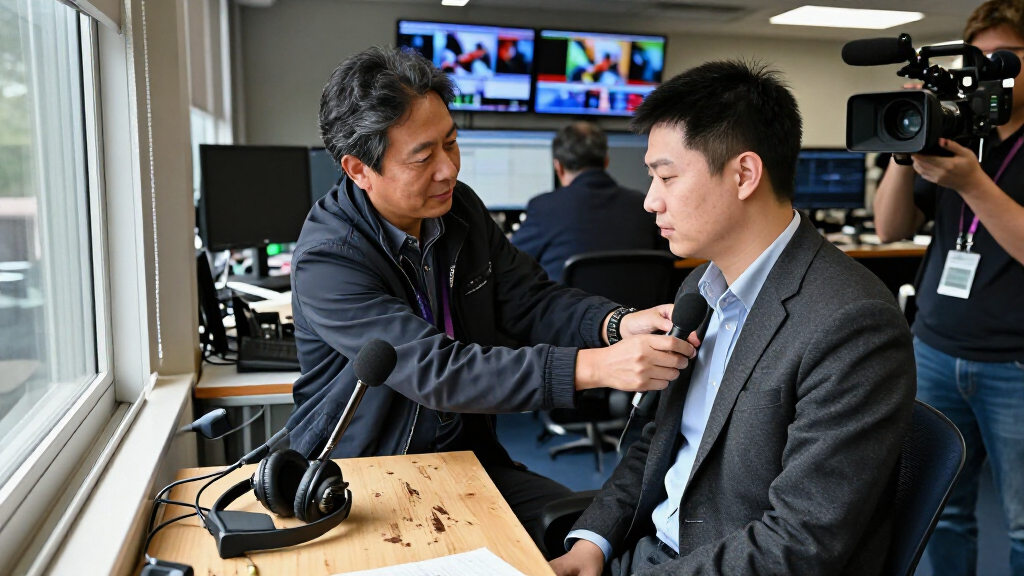

This checklist is for newsroom staff, freelancers, and field reporters preparing a reliable interview setup for 2026. Use it to think through audio, lighting, camera support, and the space around your subject before recording begins.

Get everyday essentials delivered free with Prime
- Fast, free delivery on millions of items
- Prime Video, Amazon Music and more included
- Member-only deals all year
The sections follow the main parts of a typical interview setup. Some include a named pick; the lighting and memory-card sections offer selection guidance without a specific product.
Start with the needs of your interview: where it will happen, how many people will speak, and what recording equipment you already use. Check fit and compatibility across the whole setup, then use the look-for points to compare options.
Portable audio recorder
A portable recorder gives an interview setup a dedicated place to capture sound. The Zoom H6studio Handy Recorder with 32-Bit Float Recording is the named pick for this slot. Before choosing any recorder, consider whether it suits the way your newsroom works: on-location interviews, a fixed desk setup, or a mix of both.
A common mistake is focusing on the recorder name or a headline feature without checking the rest of the audio chain. Confirm that the recorder can work with the microphones you plan to use, the connections your workflow requires, and the way you transfer files after a session. If more than one person will speak, think through how each voice will be captured and monitored. Input needs matter as much as portability.
Check the recorder’s physical size and controls against your field routine. If it will be carried between locations, consider how it fits in your bag and whether you can operate it comfortably while setting up. Review the supplied product details and your existing equipment before committing; the product name alone does not establish every connection or accessory included. A short compatibility check helps keep the interview focused on the conversation, not last-minute setup.
What to look for:
- Confirm microphone connections match your planned microphones.
- Check that the recording workflow fits your interview format.
- Consider the number of speakers you need to capture.
- Review file transfer and storage compatibility with your existing setup.
- Assess portability and control access for field use.
Zoom H6studio Handy Recorder with 32-Bit Float Recording

The Zoom H6studio records up to six individual tracks plus a stereo mix with 32-bit float audio and look-ahead limiters to help prevent distortion. It features large 19.4 mm microphones, recording rates from 44.1 to 192 kHz, and up to 15 hours of operation on four AA batteries.
Pros:
- 32-bit float recording helps avoid clipping
- Records up to six tracks plus a stereo mix
- Look-ahead limiters help prevent distortion
- Up to 15 hours of battery life
Cons:
- Requires four AA batteries for portable operation
Best for: Teams building a portable interview audio setup
Not ideal for: Buyers who have not checked microphone and workflow compatibility
Bottom line: Choose the Zoom H6studio after confirming it fits your microphones, speaker count, and file workflow.
Lavalier microphone
A lavalier microphone can keep a speaker’s voice close to the recording setup while leaving their hands free. The listed pick is the DJI Mic 3 Wireless Microphone (2 Transmitters, 1 Receiver, Charging Ca. Its product name identifies a two-transmitter, one-receiver configuration, so consider whether that arrangement matches the number of people you plan to record.
One common buying mistake is treating a wireless microphone as automatically compatible with every recorder or camera. Check the receiver’s connection against your recording device, and verify how the system is worn and operated during an interview. Think about whether the reporter and guest need separate transmitters, and how you will manage placement without distracting from the conversation. Device compatibility and speaker count should guide the decision.
Before an interview, account for clothing, movement, and the recording environment. A mic that is easy to position for one outfit or seated conversation may need a different placement for another. Confirm what the product listing says about included accessories and charging arrangements rather than assuming details from the abbreviated name. Make sure the charging case and receiver work with your team’s routine, and decide how the system fits alongside any recorder or camera already in use. A deliberate setup supports clear, consistent capture.
What to look for:
- Match the transmitter count to the number of speakers.
- Verify receiver connections with your recorder or camera.
- Check wearing and placement options for interview clothing.
- Confirm included accessories from the product listing.
- Plan charging and storage as part of the newsroom workflow.
DJI Mic 3 Wireless Microphone (2 Transmitters, 1 Receiver, Charging Case)
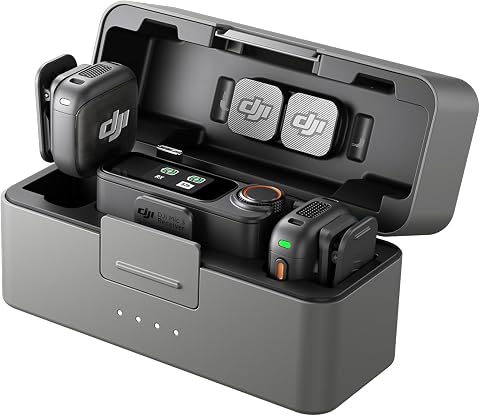
This compact wireless microphone kit includes two transmitters, one receiver, a charging case, and a USB-C phone adapter. It supports multi-transmitter pairing, adaptive gain control, two noise-cancellation levels, and 32-bit float internal recording, with up to 28 hours of power.
Pros:
- Compact kit for travel and mobile recording
- 32-bit float internal recording helps preserve audio detail
- Adaptive gain control and adjustable noise cancellation
- Up to 28 hours of power
Cons:
- Receiver and additional transmitters may be needed for larger multi-person setups
Best for: Interviews where two speakers need transmitters
Not ideal for: Setups whose recording device connection has not been confirmed
Bottom line: Use the DJI Mic 3 when its two-transmitter configuration and receiver connection fit your recording setup.
Interview lighting kit
Lighting helps make an interview subject visible and comfortable in the frame. With no named product for this slot, choose a kit around the room, camera position, and number of people in the shot. The subject and setting should drive the selection: a compact arrangement may suit a tight location, while a broader setup may be needed to cover more than one seat.
A frequent mistake is buying lights before considering where they can be placed. Look at available floor or desk space, nearby power, and the direction of windows or overhead fixtures. Consider whether stands can be positioned without blocking walkways or creating clutter around the subject. If the interview moves between locations, prioritize a setup that your team can carry and assemble comfortably. Room constraints often matter more than a long feature list.
Check that the kit’s controls and light sources make sense for the camera and the look your newsroom needs. Think through whether you need to illuminate one face or multiple people, and whether the same arrangement can work for seated and standing interviews. Confirm what is included—such as stands or other mounting pieces—before relying on the kit for a shoot. A practical lighting choice supports a repeatable setup and keeps attention on the person being interviewed.
What to look for:
- Choose coverage for one subject or the full interview frame.
- Check stand placement against room size and walkways.
- Consider power access at likely interview locations.
- Confirm included stands and mounting pieces.
- Favor controls and setup steps your team can repeat.
Camera tripod
A tripod provides a stable support point for a camera during an interview. The named pick is the SIRUI AM-324S+G1 Carbon Fiber Tripod with G1 Ball Head. For any tripod, begin with the camera, lens, and accessories you intend to mount, then check the product specifications against the assembled setup.
A common mistake is choosing support based only on a material or head style. Confirm that the tripod’s stated capacity and mounting interface suit your camera rig, and consider how the head moves for the framing you need. The ball head named in this pick may matter to your operation, so check that its controls and movement feel appropriate for the way your team frames interviews. Rig compatibility is essential before relying on it in the field.
Think about the environments where the tripod will be used. Check its folded size and packed weight against your transport routine, and consider how easily it can be positioned in a cramped interview room. If your camera setup changes, verify each configuration rather than assuming one fit covers all. Review the listing for included plates or other mounting pieces, and confirm whether anything else is needed for your camera. A tripod that suits both the camera rig and location helps make framing repeatable.
What to look for:
- Match the stated load capacity to the complete camera rig.
- Verify the mounting interface and any required plate.
- Check that the head movement suits your framing needs.
- Compare folded dimensions and weight with your transport routine.
- Confirm included mounting pieces in the product listing.
SIRUI AM-324S+G1 Carbon Fiber Tripod with G1 Ball Head

This carbon fiber tripod supports camera setups weighing up to 44.09 lb and extends to a maximum height of about 60 inches. It weighs 3.8 lb, folds to 22.05 inches, and includes six accessory mounting ports for attaching gear such as monitors, microphones, and lights.
Pros:
- Supports heavy camera setups up to 44.09 lb
- Lightweight carbon fiber construction
- Six accessory ports support modular rig setups
- Corrosion-resistant construction for outdoor use
Cons:
- Maximum height is listed inconsistently as 57 inches and 153 cm
- The product information lists both carbon fiber and aluminum materials
Best for: Teams seeking a dedicated camera support setup
Not ideal for: Rigs whose weight or mounting fit has not been checked
Bottom line: Choose the SIRUI tripod after confirming the full rig fits its capacity and mounting setup.
Acoustic panels
The acoustic treatment slot is represented by the Soundproof Office Pod Booth with Acoustic Panels, Portable Modular Pri. The product name describes a booth with acoustic panels and a portable modular design. Consider whether your newsroom needs a dedicated enclosed space for interviews or whether its available room and workflow call for another approach.
A common mistake is assuming that acoustic panels alone settle every sound concern. Check the dimensions, layout, and access requirements for the booth, and compare them with the space where it would be installed. Think about how many people need to fit, where recording equipment will sit, and whether the door and interior arrangement support a comfortable conversation. The word “portable” does not establish how the booth moves or what assembly it needs, so verify those details in the listing. Space and access should be checked early.
Before selecting this option, review the product information for panel placement, materials, assembly, and any requirements for the room or floor. Consider how the booth works with your microphones, camera framing, lighting, and ventilation needs. If the newsroom shares its space, check whether the booth’s footprint and routine use fit other activities. Do not infer performance details from the product name; match the documented specifications to your priorities. A good fit supports a usable interview environment as well as the recording workflow.
What to look for:
- Measure the available room and compare it with booth dimensions.
- Check capacity and access for everyone in the interview.
- Verify assembly and moving requirements in the listing.
- Review panel placement and documented product specifications.
- Consider camera, microphone, lighting, and room workflow together.
Soundproof Office Pod Booth with Acoustic Panels, Portable Modular Privacy Works

This soundproof office pod provides a private, quiet environment with sound reduction of approximately 35dB, ideal for phone calls, meetings, or streaming. It features adjustable lighting, ventilation, multiple power outlets, and mobility with 360° wheels, making it suitable for various settings like offices, homes, and public spaces.
Pros:
- Effective soundproofing for private calls and meetings
- Adjustable lighting and ventilation for comfort
- Portable with 360° wheels and locking stabilizers
- Includes desk, stool, and multiple power outlets
Cons:
- Assembly may take several hours
- Limited to single person use
- Requires space for mobility
Best for: Newsrooms considering a contained interview space
Not ideal for: Teams without room to verify footprint and access
Bottom line: Consider the modular booth only after its dimensions, assembly, and documented specifications fit your space.
SD memory cards
Memory cards are part of the recording plan for camera and audio equipment that uses them. No specific card is named for this slot, so identify the devices first and check their documentation for supported card types. A card that fits physically may still be unsuitable for a particular device or recording format.
A common mistake is choosing a card based on capacity alone. Verify the card type, speed requirements, and maximum supported capacity for each recorder or camera you will use. If the same interview is recorded on multiple devices, make a short compatibility list for each one rather than assuming the requirements match. Consider how much recording time your work calls for, and plan storage around the format and session length. Device specifications are the useful starting point.
Check how cards will be labeled, transferred, and protected after recording. Decide whether your team needs a consistent card-handling routine across cameras and recorders, and confirm that your transfer equipment supports the selected format. Keep enough compatible media available for the planned session and your established file workflow. Before a shoot, confirm the card is recognized by the device and ready for the intended recording. That simple preparation helps avoid a preventable interruption during an important interview.
What to look for:
- Check supported card type for every recording device.
- Match speed and capacity requirements to device documentation.
- Plan capacity around format and session length.
- Confirm transfer equipment supports the selected card format.
- Establish a labeling and card-handling routine.
Build your setup in a practical order: first confirm the recorder, microphones, and storage work together; then address camera support and the interview space; finally choose lighting to suit the location and frame. Prioritize the compatibility checks that could prevent recording, then fill in accessories and workflow details.
You do not need to solve every room or interview in the same way. Use this checklist as a starting point, verify product details against your own equipment, and adjust the setup to the people and spaces you cover. A little preparation supports a calmer, more consistent interview.
Halloween Picks
halloween
As an affiliate, we earn on qualifying purchases.